What if unexpected message or dialog appeared during the file search – FSA can manage with it!

June 3rd, 2010

File Search Assistant can search for MS Word (.doc) files, this is normally a great feature as it allows to search in your archive of documents, but one annoying thing can slow down the process.

If you Word document has a password or there is some kind of error (like macro error) inside or some other problem appeared during opening the document you may face the problem. If you open just one document you just click “Cancel” and forget about this. But if you deal with more documents this might be an issue.

Good news! The latest version of FSA allows to ignore these messages. The program will automatically click “Cancel” if during the search program will find some problem document.

  • Share/Bookmark

admin Articles , , ,

FSA helped be quicker and more efficient at collecting information

May 7th, 2010

Computer numerical control programmer, Allen Beaver, Atlas Copco Secoroc, LLC, Dallas, TX

I am a computer numerical control programmer with a company that produces tricone rockbits, raisebore cutters and HDD bits for the mining and construction industries.

File Search Assistant allows to cut down time spent collecting information

In my work we have to do A LOT of work with text files, and FSA has really cut down our time spent collecting information. For instance, if we need to know how many 12 1/4″ bits use a 1″ boring bar in production, we can search for all the 12 1/4″ first, then we can search inside those results for the 1″ Boring Bar. This has really had a BIG impact on our time spent researching things like this. The ability to search results from a previous search is HUGE for us.

We purchased FSA about 4 months ago, and I’ve used it every single day since we added it to our software package. As a CNC programmer, I do a ton of work with text files, and FSA has really helped me be quicker and more efficient at collecting needed information from all our programs. The ability to search the results of a previous search is HUGE for us, and has made winnowing out information a heck of a lot easier. And as good as it’s been for us so far, we’ve only just scratched the surface of what FSA is capable of. It has a ton of great features that anyone who deals with text files every day will love. It’s a great tool that doesn’t break the bank.

  • Share/Bookmark

admin Testimonials ,

Cannot find some text? Search within pdf docs!

April 10th, 2010

Looking for missing files and documents can be a really problematic.  The problem is that hardware producers equip modern computers with huge hard drives.  Besides, there are so many file types that users are usually overwhelmed when looking for files they have lost in own computer.  By the way if you think that it is impossible to lose files in own computer you’re mistaken.  It’s pretty easy.  This is like losing some things in own apartment which you seem to know perfectly well.  It is ridiculous, but it is true.  There is nothing more difficult then to find a missing file among hundreds or thousands of folders and documents scattered all lower your hard drive.

If the files you’re missing are important to you or your company then finding them is a must.  But if you choose traditional way of looking for missing files which is called manual search you are risking to get no results that all.  Even if you’re a very experienced PC user you’re still a human being, and no one abolished human factor.  Why not let software do all the hard work for you?

Use FSA to search within pdf files

Use FSA to search within pdf files

Please, welcome…  File Search Assistant from AKS-LABS.  This program will be your search “dog” that guarantees you perfect results.  If the files you’re missing are really located in your PC and if you possess even minimal information on the files you are sure to eventually get them.

File search assistant is a very easy to use program, so you don’t have to possess any specific knowledge or experience.  Just general computer knowledge will be enough.  File search assistant can use minimum of information, but if you have more of it than this program can perform a really excellent job.

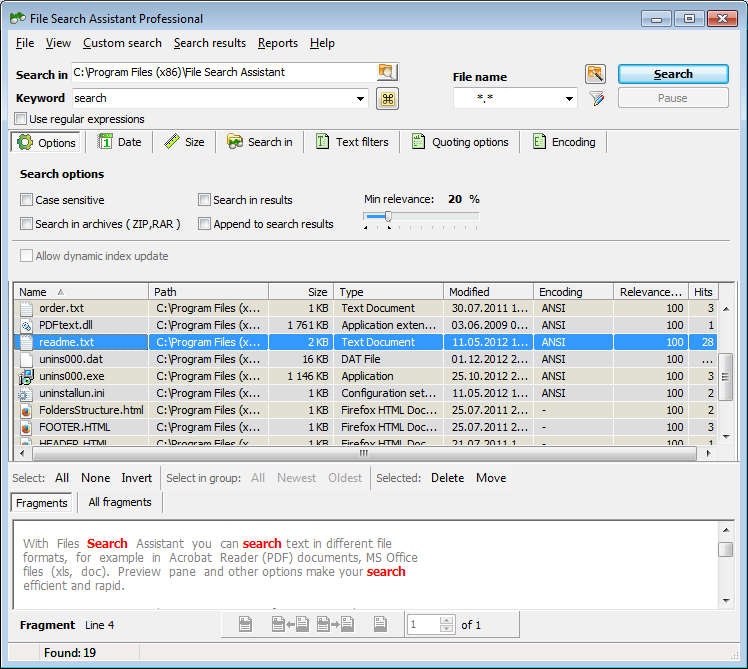
First of all, you need to select location in which File Search Assistant will look for missing files.  Then and to keywords, and make sure you made no mistakes.  Then comes the interesting part.  It is possible to look for files with particular extension on lee.  For instance, you may look only for pdf files and ignore all other extensions.  This search type is called search by mask or custom search.

Search by date and time can also narrow search results and give us sufficient advantage.  So if you have information on the size of missing files and date on which they were created, accessed or modified feel free to use this information in your surge which will make it more efficient.

Search within pdf docs for the missing text

Search within pdf docs for the missing text

  • Share/Bookmark

document_search Articles , , , , , , , ,

Looking for missing text? Search within file

April 10th, 2010

What would you do if you need to find a file but the only thing you know about it is a couple words from its contents?  You don’t know the file name and only guess what file type it may be.  If you choose the traditional way of looking for missing files you are risking to waste hours of your priestess time and turn an ordinary working day into a nightmare.  Who knows how many folders of there in your computer?  No one knows.  But the answer is very simple – many.  So, if you are looking for a missing file and you possess very little information on it then your search without the help of special software will be in effective.  It should be noted that operation systems usually have search features which are, however, helpful only in simple cases.  If you need to find a dozen of files and if you, as said above, have almost no information on the files then use of file search engines is highly recommended.

Pay your attention to File Search Assistant from AKS-LABS.  This seemingly simple software will provide you with excellent search results making the entire process very efficient.  Even if you have just one word related to missing file this will be enough for File Search Assistant to find it.  Moreover, if you have some additional information and details on the missing file than File Search Assistant can do a brilliant job.

Lost some text? Search within file!

Lost some text? Search within file!

So, what is so special about file search assistant?  At a first glance, this software doesn’t look extraordinary.  But step by step, as you explore all its features you tend to understand that this is a really remarkable program.  “What features?” you would ask.  Here is the answer.

  1. Search by keywords criterion.  It is even possible to search for missing files by copying and pasting parts of texts.
  2. Converter.  File Search Assistant can convert a number of file types in order to open them and look for key words inside the files.  Thus, it can open office documents, open office files, pdf docs, HTML pages, multimedia files etc.
  3. Preview function.  When you’re viewing search results it is possible to preview any file simply by clicking on it.  Thus, you do not have to manually open all the files to see which file you actually need.
  4. Search by mask, date and size will narrow search results and thus save your time.
Use FSA to search within file

Use FSA to search within file

  • Share/Bookmark

document_search Articles , , , , , , , ,

FSA is an ultimate tool to search lost file

April 10th, 2010

People who work with huge volumes of information from time to time faced the problem of losing files.  Well, not exactly losing, but certain files may be quite difficult to find.  For example, if you are a translator who has just received me you peace or work to do and you see that you have already translated certain abstracts you need to find files and documents that contain certain keywords.  Of course opening all the files in your folders which refer to your translation activity is not a smart way to do that.  Firstly, it will take much time.  Secondly there are no guarantees that you’ll eventually find the file or documents you been looking for.  It seems like there is no way out.  But it is not so.  If you choose to use special automated file search utilities you will easily solve the problem of missing files.

AKS-LABS offers its file search solution called File Search Assistant.  Perhaps when you first run this program you will think that it is not quite effective.  Why? It is because the Prado Gramm seems very simple and as a very simple interface.  We got accustomed to think that simple things do not work.  Well, File Search Assistant proves the opposite.  The program is at a very powerful file search engine with a handful of useful features and functions which make search process fussed, effective and in some cases even enjoyable.  Now let’s review file search assistant features to fully explore the program’s power.

Search lost file with FSA

Search lost file with FSA

First of all, it needs saying that File Search Assistant has three a basic file search criteria.  These are search by keywords, search by mask, and search by date and size.  Search by keywords is the most important criterion as file search assistant looks for the specified keywords inside the files, as well as in the files names.  By the way, File Search Assistant can convert a number of file types to open them and look for key words inside the files.

Search by mask is looking for files with particular extension.  For example you might be interested only in the pdf files, HTML pages or office documents.  Custom search will help you narrow search results which in its turn saves your time.

Search by date and size are only then effective if you possess information on the size of files and dates they were modified, created or even accessed.  All you need to do is to enter the relevant information in the relevant check boxes and press search button.

Use FSA to search lost file

Use FSA to search lost file

  • Share/Bookmark

document_search Articles , , , , , ,

Don’t know how to search text? Use File Search Assistant

April 10th, 2010

There can be nothing easier than losing files or documents stored in own computer.  It’s and ridiculous as most of us seem to know own computers pretty well.  However, we sometimes faced the problem of looking for missing files.  Of course, if you guess were the files might be you don’t need any software to help you.  But if you have no idea where to look for the missing files Manual search will turn into a nightmare.  Moreover, this nightmare may bring no results it all, and missing files will become lost ones.  It is well known that loss of business information or any documents related to business activity can be very painful and may lead to serious consequences.

So, imagine a hypothetical situation.  You need to find two of three files and you don’t know their location.  The only thing you know is a couple of words that these files should contain, or at least you hope that the keywords are correct.  With the help of a special file search utility like File Search Assistant from AKS-LABS the search process will take very little time.  Why?  It is because File Search Assistant is in extremely efficient program that is very easy to use at the same time.  With file search assistant you require a minimum of information about missing documents.  This software will give a definite answer to the question “how to search text?”

Ask AKS LABS how to search text

Ask AKS LABS how to search text

It often happens that you need to find a text or part of the text but not the whole file.  In File Search Assistant you can specify keywords or copy and tastes the entire abstract you’re looking for.  Besides, there are numerous options and search criteria which will be or other helpful to find missing files as soon as possible.

What are these criteria?  First of all, as set above, this is search by key word.  Make sure you correctly enter all keywords since the program will search for them in the files names and inside the files.

If you know that you’re looking for particular file type you may use search by mask feature.  All you have to do is to start a custom search and enter file mask you’re interested in.  For instance, this may be open office document, pdf file or maybe a multimedia file.

Search by date and size provides File Search Assistant with additional information so that the program can narrow search results.

File Search Assistant knows how to search text

File Search Assistant knows how to search text

  • Share/Bookmark

document_search Articles , , , , ,

Look for missing text and find within word files

April 10th, 2010

Most information including the one concern in business is stored in computers.  Thus, office computers are full of files, folders and documents.  It is very difficult to sort out files in such a way so that you easily find them.  Inattentive or unscrupulous users usually faced the problem of missing files and documents.  How can one lose files in own computer?  Easy!  Say, you have saved the file in a folder and in several days you forgot the folder name.  When you are required to share this file or e-mail it you cannot find it.  This is the beginning of your problems.  You get nervous and start looking for this file in all folders in your computer.  All of a sudden you realize that this search will take hours, and no one can guarantee you that the files will be eventually found.  Sounds like a real problem, huh?

But don’t worry!  If you get yourself File Search Assistant developed by AKS-LABS you will have all your problems related to missing files and documents immediately solved.  Use of this file search solution is recommended both to ordinary users and office employees who deal with thousands of files and documents and for whom data loss may cost a career.

Find within word docs the text you have been missing

Find within word docs the text you have been missing

File Search Assistant is designed in such a way so that users with minimum IT knowledge can easily and successfully operate this program.  Many users think that simplicity of automatically means inefficiency.  Well, this is not so in case of File Search Assistant.  Let’s explain why.

File Search Assistant has several search criteria which are very helpful in finding missing documents.  The most important criterion is search by key words.  File Search Assistant can look for key words in the file names, as well as inside the files (pdf docs, Office files, Open Office documents, HTML pages, multimedia files etc).

Search by mask is another important criterion to be taken into account.  For example you want to find a file containing key word “business”.  File Search Assistant may find dozens of different file types which contain this key word.  But if you know that you are looking only for pdf files were open office docs then you can eliminate other file types during the search.  This narrows search results and saves your time.

Search by date and size can also help save time as File Search Assistant will look only for files of particular size and files modified, accessed or created on the particular date or period of time.

Use FSA to find within word files missing texts

Use FSA to find within word files missing texts

  • Share/Bookmark

document_search Articles , , , , , , , , , , , , ,

Use File Search Assistant to find within excel spreadsheets keywords and phrases

April 10th, 2010

If you are a professional who works with numerous files and documents you have probably faced the problem of losing data.  It should be noted that sometimes we think that we have lost files but in fact of those files are simply missing.  It means that they are stored somewhere in your computer but you simply cannot find them.  It is like looking for something in a messy room or apartment.  You seem to know everything and every corner in your apartment but it sometimes happens that you cannot find some things that belong to you.

Computer is like an apartment although it has far more rooms so to say.  There are hundreds and thousands of folders in your computer.  Of course you tried to sort out information, process and analyze files and save them in such a way so that you can find them out when you are required to do so.  However, everything may happen.  We are human beings and we can make mistakes.  You copy or saved the file to a particular folder and then completely forget about it.

Find within excel docs missing texts

Find within excel docs missing texts

File search assistant is the kind of software that you really need.  Losing files can be very painful, especially if these documents are related to business activity.  With the File Search Assistant you will forget about losing files due to inattentiveness or mistakes.  This file search solution combines the principles of simplicity and efficiency which is very important in today’s market.

One of the greatest advantages of File Search Assistant is the possibility to look for particular file types.  For instance, if you know that you need only word documents you do not need any other file types in the list of results.  This makes search process faster and more efficient.

Custom search is about looking for particular file types.  You simply set the mask and wait for results.  You can edit new masks and edit existing ones.

File Search Assistant has a number of converters which make it possible to open certain file types to look for key words inside them as well as in the files names.  For example, you can look for key words in pdf documents or HTML pages.

File Search Assistant has additional search criteria such as search by date and size.  If you are aware of files size or the date when the file was created, accessed or modified you can use this information to your benefit.

Use FSA to find within excel files missing parts of text

Use FSA to find within excel files missing parts of text

  • Share/Bookmark

document_search Articles , , , , , , , , , , ,

Find and preview documents with File Search Assistant

April 10th, 2010

If you think that it is impossible to lose files in own computer then you are mistaken.  Have you ever lost some things in your own apartment?  Sure you have.  It is ridiculous but you cannot find some things in your apartment which you know perfectly well.  The same concerns your computer.  You think that you know all folders and locations of all files.  But when the time comes to find some files and documents which you need urgently you cannot find them as they are not there were you expected them to be.  What do you do in such cases?  You get nervous and start browsing folder by folder.  This brains no visible results in you start thinking that the missing file is lost forever.

No, it is not.  With the help of special automated file search systems you all will require several minutes to find missing documents.  If you choose to use File Search Assistant from AKS-LABS you will understand that searching for missing files can be fun.  Why?  Just use this program for some time and you will understand everything.  In this article we will review certain features of File Search Assistant that vividly demonstrate efficiency and simplicity of this program.

Use File Search Assistant to find and preview files

Use File Search Assistant to find and preview files

So, why is file search assistant effective, convenient and simple?

  1. Unlike similar file search utilities and search engines of operation systems, File Search Assistant can look for key words inside the files and in the files names.  In other words file search assistant converts certain file extensions into plain text files and look for key words there.  Thus you can look for missing text in HTML pages, multimedia files, pdf documents and all extensions related to MS Office products.
  2. If you are interested only in certain file extensions you can use custom surge.  All you have to do is to enter file extension.  If you’re looking for pdf file you can enter pdf as a mask and File Search Assistant will ignore all other file types.  This saves your time and makes search process more efficient.
  3. Should you have additional information on the files then search by date and size before you.  File search assistant can look for files of particular size and files created, accessed or modified on the certain date or during certain time span.
  4. You can use right button mouse menu in relation to the files listed in the search results.  Thus you can copy or delete all or some of the files.
Find and preview documents with File Search Assistant

Find and preview documents with File Search Assistant

  • Share/Bookmark

document_search Articles , , , , , , ,

How to find document? Guys from AKS-LABS know how

April 10th, 2010

Imagine that you’re a document officer or a secretary working for the major company.  Every day you have to process huge volumes of information.  You receive emails, agreements, advertising proposals, business offers and other types of business documents.  Of course you tried to summarize this information, sorted out and organize in your computer so that you can easily find all files and documents if necessary.  But no one is perfect.  We should not forget about human factor.  You may save or copy a file to some folder and forget about it until you are required to print this file and send it to your boss.  “How to find document?” you will ask.  Well, there are many ways to do that.

The traditional way of looking for missing files is just browsing folder by folder.  But Manual search will take so much Time &Energy that often are 15 of 20 minutes you will understand that you done all this job in vain.  So, if you want to feel sure that you’ll find the missing files you should certainly use special automated file search solutions.

AKS File Search Assistant how to find document

AKS File Search Assistant how to find document

AKS-LABS offers you File Search Assistant which is then effective program that will look for missing files stored in your computer.  Even if you have very little information on the missing files File Search Assistant will still perfectly do its job.

Let’s review file search process with this incredibly effective software.

First and foremost, you need to select locations in which File Search Assistant will look for missing files.  You can select the entire hard drive, or several different folders.  Specifying keywords is the most important stage of file search process.  File Search Assistant will look for key words both inside the files (due to special converters) and in the files names.

If you have some additional information on the missing files, for example you know that you are looking for excel files or HTML pages then you can use custom search.  Search by mask gives you an opportunity to set certain file extensions which you are interested in.  In such a way File Search Assistant we’ll look for particular file types only.

If you know something about size of the missing files or data they were created, accessed or modified than you can make an effective use of search by date and size options.  For example, File Search Assistant may look for files that are larger than 5MB, or files that were created later than January 10th, 2010.

How to find document? Ask AKS-LABS

How to find document? Ask AKS-LABS

  • Share/Bookmark

document_search Articles , , , , ,